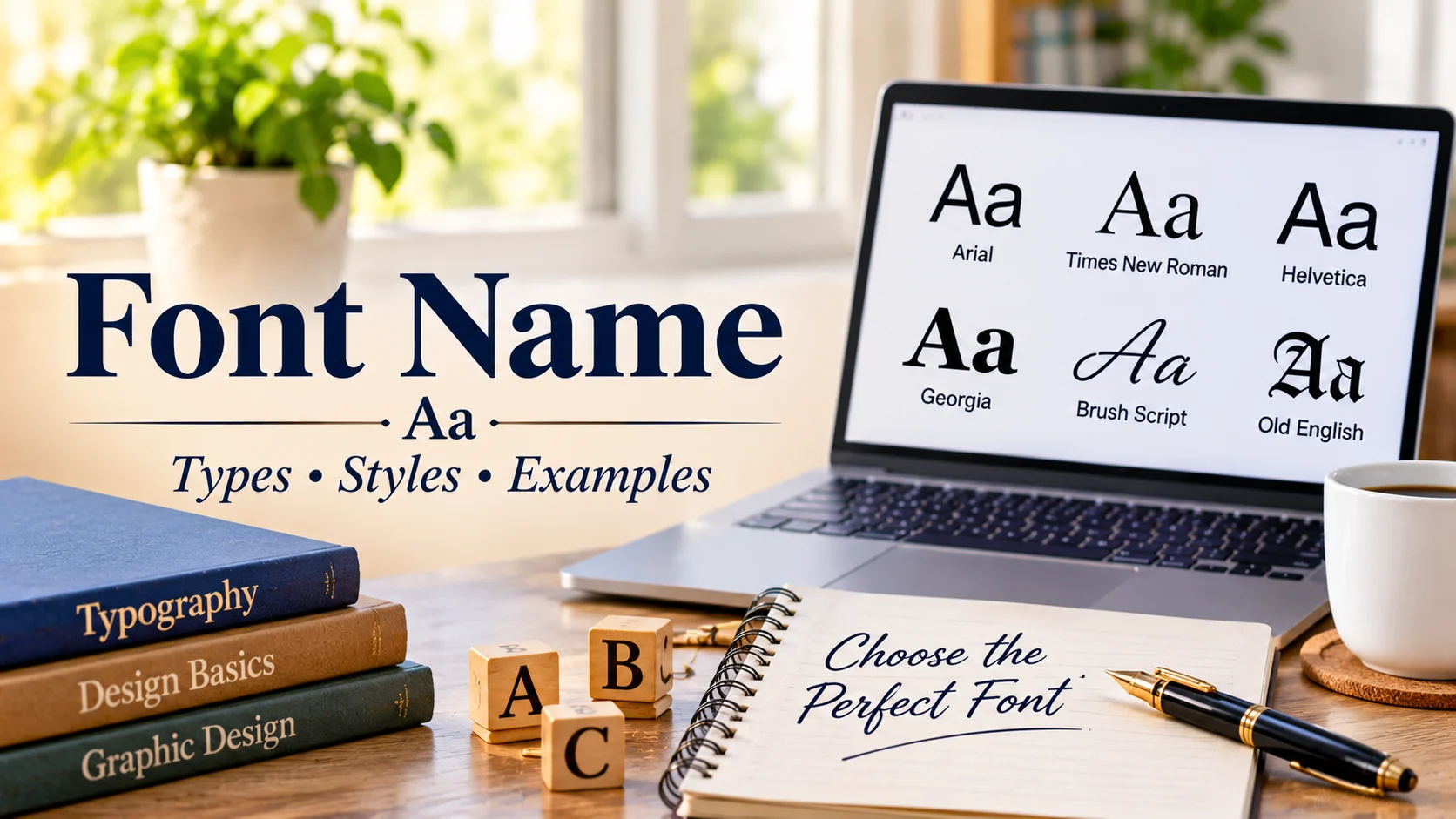
A font name is the name used to identify a particular font or typeface design, such as Arial, Times New Roman, Helvetica, or Roboto. Font names help users select, recognize, organize, and apply different lettering styles in documents, websites, logos, advertisements, and graphic designs.
Fonts influence how written information looks and feels. Some create a professional and traditional appearance, while others communicate creativity, elegance, friendliness, or modern simplicity. Understanding font names makes it easier to choose suitable typography and recognize the styles used in different designs.
In this guide, you will learn what a font name means, explore popular font names, understand the main font categories, discover how fonts developed, and learn practical ways to identify a font from an image or document.
What Is a Font Name?
A font name is the identifying label assigned to a font or typeface family. It allows users to find a particular letter design in applications such as Microsoft Word, Adobe Photoshop, Canva, Google Docs, and website design tools.
For example:
- Arial is a widely used sans-serif font.
- Times New Roman is a traditional serif font.
- Roboto is a modern sans-serif font.
- Comic Sans MS has an informal, handwritten-inspired appearance.
- Pacifico is a decorative script font.
Each font has recognizable characteristics, including letter shapes, stroke thickness, spacing, proportions, and overall appearance.
Why Are Font Names Important?
Font names make typography easier to manage and use. Without identifiable names, designers and everyday computer users would have difficulty selecting consistent lettering styles.
They are particularly useful for:
- Document formatting: Choosing readable fonts for reports, assignments, and business documents.
- Graphic design: Selecting appropriate typography for posters, advertisements, and social media graphics.
- Brand identity: Maintaining consistent lettering across logos, websites, and marketing materials.
- Website development: Applying specific font families to headings, paragraphs, and navigation.
- Creative projects: Finding distinctive lettering styles for invitations, artwork, and presentations.
A recognizable font name also makes it easier to share design instructions with other people.
Font Name Meaning: What Does a Font Name Represent?
The meaning of a font name is primarily its identity within a collection of type designs. Unlike personal names, font names do not generally have traditional meanings connected to language, ancestry, or naming customs.
Instead, they identify particular typographic designs.
For example, when someone selects Georgia, they are choosing a specific typeface design rather than describing the meaning of a word.
A font name may identify:
- A complete typeface family.
- A particular lettering design.
- A specific style or variation.
- A commercial or independently distributed font.
- A font available through a digital typography library.
Some font names are connected to their designers, publishers, historical references, or intended applications. However, the origin of each name depends on its individual design history.
Font Name vs. Font Style
A font name and a font style are related but different concepts.
The font name identifies the design, while the font style describes how a particular version looks.
For example, Arial can appear in several styles:
- Arial Regular
- Arial Bold
- Arial Italic
- Arial Bold Italic
These variations retain the same basic design identity but change the appearance of the letters.
Origin and Etymology of Fonts
The word font has historical roots in the development of printing and typography.
It is derived from the French word fonte, associated with the act of casting or melting. The term became connected with the production of metal printing type, where individual letters and symbols were manufactured as physical pieces.
Historically, printers needed collections of metal characters to produce written material. These collections included particular designs, sizes, and styles.
Over time, the meaning of font developed alongside printing technology.
Early Printing and Metal Type
10 zajímavostí o tisku | OriginálníTonery.cz
Historic Trades & Skills – Colonial Williamsburg
10
Before digital typography, printed letters were created using physical type.
Printers arranged individual metal characters into words and sentences before transferring ink onto paper. Different collections of type were used for different lettering styles and sizes.
The introduction of movable type printing in Europe during the fifteenth century helped expand the use of standardized printed lettering.
Development of Modern Typography
As printing technology advanced, type designers developed more styles and organized them into families.
Industrial printing introduced new opportunities for:
- Different letter weights.
- Italic and bold variations.
- Decorative lettering.
- Newspaper and book typography.
- Commercial advertising designs.
The development of phototypesetting and later digital typography changed how fonts were produced and distributed.
Digital Fonts and Modern Design
Tools for the modern designer | Typographer
Grafik Tasarım: Tipografi Kuralları ve Doğru Font Seçim | Özel Ders Alanı
Louis Paquet – Creative Director and Designer in Montreal, Quebec, Canada :: Behance
12
Today, fonts are generally distributed as digital files that can be installed or accessed through software and online services.
Common digital font formats include:
- OTF (OpenType Font): A widely used format supporting advanced typographic features.
- TTF (TrueType Font): A common scalable font format.
- WOFF: A web font format designed for website use.
- WOFF2: A compressed web font format that helps reduce file sizes.
Modern variable fonts can also support adjustable characteristics such as weight and width within a single font file. Adobe Help Center+1
Different Types of Fonts and Their Names
Fonts are commonly grouped according to their visual characteristics. Understanding these categories helps you identify appropriate font names for different purposes.
1. Serif Fonts
What Is Typography? | A Full Rundown
Serif fonts contain small decorative strokes or extensions at the ends of certain letter strokes.
They often communicate tradition, formality, sophistication, and authority.
Popular serif font names include:
- Times New Roman
- Georgia
- Garamond
- Baskerville
- Bodoni
- Playfair Display
- Merriweather
- Libre Baskerville
Common uses:
- Books and printed publications.
- Editorial websites.
- Formal invitations.
- Academic documents.
- Luxury branding.
2. Sans-Serif Fonts
Professional Fonts for Your Professional Website | Wedoflow
Sans-serif fonts do not have the small decorative strokes found in serif designs.
The word sans means without, so sans-serif literally describes lettering without serifs.
These fonts are often associated with simplicity, clarity, and modern design.
Popular sans-serif font names include:
- Arial
- Helvetica
- Roboto
- Open Sans
- Lato
- Montserrat
- Poppins
- Inter
- Verdana
- Futura
Common uses:
- Websites and mobile applications.
- Business presentations.
- Modern logos.
- Digital advertisements.
- User interfaces.
3. Script Fonts
Mocca Letter (or: Fana Studio)
Script fonts imitate handwritten lettering, calligraphy, or connected cursive writing.
Depending on their design, they can appear elegant, personal, romantic, or artistic.
Popular script font names include:
- Pacifico
- Great Vibes
- Dancing Script
- Allura
- Alex Brush
- Lobster
- Sacramento
- Brush Script MT
Common uses:
- Wedding invitations.
- Greeting cards.
- Signature-style logos.
- Creative packaging.
- Decorative headings.
Script fonts are generally better suited to short text than long paragraphs because some designs can be difficult to read at smaller sizes.
4. Display and Decorative Fonts
Dubba Hubba Display Font, a Font by Brethrendesignco
Display fonts are designed to attract attention. They often feature distinctive shapes, unusual proportions, decorative details, or expressive lettering.
Examples include:
- Bebas Neue
- Anton
- Abril Fatface
- Impact
- Bangers
- Cinzel Decorative
- Cooper Black
Common uses:
- Posters.
- Headlines.
- Event promotions.
- Product packaging.
- Entertainment graphics.
These fonts work best when their visual impact is more important than reading long passages of text.
5. Monospace Fonts
Evaluating Programming Fonts & Choosing the Right One for You
Monospace fonts give every character the same horizontal spacing.
For example, the letter I and the letter W occupy equal character widths, although their visible shapes differ.
Popular monospace font names include:
- Courier New
- Consolas
- Monaco
- Menlo
- IBM Plex Mono
- Source Code Pro
- Roboto Mono
Common uses:
- Programming and coding.
- Terminal interfaces.
- Technical documents.
- Displaying source code.
- Tabular information.
Popular Font Names List
If you are looking for recognizable font names, the following table provides examples from different typography categories.
| Font name | Font category | Common impression |
|---|---|---|
| Arial | Sans-serif | Simple and practical |
| Times New Roman | Serif | Traditional and formal |
| Helvetica | Sans-serif | Clean and neutral |
| Georgia | Serif | Classic and readable |
| Roboto | Sans-serif | Modern and versatile |
| Garamond | Serif | Elegant and traditional |
| Montserrat | Sans-serif | Contemporary and bold |
| Poppins | Sans-serif | Geometric and friendly |
| Pacifico | Script | Casual and creative |
| Great Vibes | Script | Elegant and decorative |
| Bebas Neue | Display | Strong and condensed |
| Impact | Display | Bold and attention-grabbing |
| Courier New | Monospace | Typewriter-inspired |
| Consolas | Monospace | Technical and structured |
| Playfair Display | Serif | Editorial and sophisticated |
These are examples rather than a ranking. The best option depends on the project’s purpose, audience, and visual requirements.
How to Identify a Font Name From an Image
Sometimes you see an attractive font in a logo, advertisement, website screenshot, or social media graphic but do not know its name.
Font identification tools can help you find a matching or visually similar typeface.
Here are several practical methods.
1. Use an Online Font Identifier
Find Font From Image – Why Identifying Fonts Is Easy [VIDEO]
Online font identification services analyze uploaded images and suggest fonts with similar letter shapes.
Some popular options include:
- WhatTheFont — Visit WhatTheFont.
- Font Squirrel Matcherator — Visit Matcherator.
- Adobe Fonts — Explore Adobe Fonts.
The general process is straightforward:
- Take a clear screenshot of the lettering.
- Crop the image so the text is easy to recognize.
- Upload the image to a font identification tool.
- Select or confirm the detected letters if requested.
- Review the suggested font names.
- Compare the results with the original design.
The suggested result may not always be an exact match, especially when the lettering has been modified.
2. Check the Font Name in Microsoft Word
If you receive a Word document and want to know which font it uses:
- Open the document in Microsoft Word.
- Select the text you want to inspect.
- Open the Home tab.
- Locate the font dropdown in the Font section.
- Read the displayed font name.
If different sections use different fonts, select each section separately.
3. Identify a Font in Adobe Photoshop
To check a font in Photoshop:
- Open the image or design.
- Select the Type tool.
- Click the relevant editable text layer.
- Look at the font family field in the options bar or Character panel.
If the text is part of a flattened image rather than an editable text layer, you may need a font identification service instead.
4. Find a Font Name on a Website
Website typography can often be identified using browser developer tools.
A practical approach is:
- Open the website in Chrome or another browser.
- Right-click the text you want to inspect.
- Select Inspect.
- Find the selected text element in the developer panel.
- Check its CSS
font-familyproperty.
The property may contain several font names. These are usually listed in order of preference, allowing the browser to use another available font if the first one cannot load.
How to Choose the Right Font Name for Your Project
Finding a font is only the first step. Choosing the right one requires considering how it will work with your content and design.
Consider the Purpose
Different projects need different typography.
For example:
- Business reports benefit from clear, professional fonts.
- Wedding invitations may suit elegant script fonts.
- Technology websites often use clean sans-serif designs.
- Editorial publications may use traditional or contemporary serif fonts.
- Posters can use bold display fonts.
Prioritize Readability
A visually attractive font is not automatically easy to read.
Before selecting one, consider:
- Letter spacing.
- Character shapes.
- Font size.
- Line spacing.
- Contrast against the background.
- Readability on mobile screens.
Avoid overly decorative fonts for long paragraphs.
Maintain Consistency
Using too many unrelated font families can make a design appear disorganized.
A practical starting point is to use two complementary font families:
- One for headings.
- One for body text.
For example, Playfair Display can create distinctive headings, while Open Sans can provide readable paragraph text.
Consider Your Audience
Typography communicates personality even before someone reads the words.
A formal financial report and a playful children’s invitation require different visual approaches. Select a font that matches the audience’s expectations and the message you want to communicate.
Font Name vs. Typeface vs. Typography
These terms are closely connected, but they do not mean exactly the same thing.
| Term | Meaning | Example |
|---|---|---|
| Font | A specific typographic implementation or style | Arial Bold |
| Typeface | The overall design of the letters | Arial |
| Font family | A collection of related styles and weights | Arial family |
| Font style | A variation in appearance | Italic or Bold |
| Typography | The art and technique of arranging text | Font selection and spacing |
In everyday conversation, people frequently use font and typeface interchangeably. In professional typography, however, the distinction can be useful. Traditionally, a font referred to a particular style, weight, and size, while a typeface referred to the underlying letter design. Modern digital usage has made these terms more flexible. Adobe UK+2
Font Name vs. Font Family
A font family groups related styles under a shared design identity.
For example, a family may include:
- Regular
- Light
- Medium
- Semibold
- Bold
- Italic
These variations provide flexibility while preserving a consistent visual appearance.
Where Are Font Names Commonly Used?
Font names appear across many digital and printed environments.
Documents and Office Applications
Microsoft Word, Google Docs, and similar applications provide font menus that allow users to change the appearance of their documents.
Graphic Design
Design software uses font names to help designers maintain consistent typography across visual projects.
Websites and Blogs
Web developers specify font families using CSS to control how website text appears.
Logos and Branding
Businesses use carefully selected typefaces to establish recognizable visual identities.
Social Media
Creators use different lettering styles in promotional graphics, thumbnails, advertisements, and other content.
One important distinction is that some social media font generators produce Unicode characters that resemble styled lettering rather than applying a conventional installed font. These characters may not display consistently across devices or assistive technologies.
FAQs
1. What is a font name?
A font name is the identifying name of a particular font or typeface, such as Arial, Helvetica, Roboto, or Times New Roman. It helps users select and apply specific lettering styles in documents and designs.
2. What are some popular font names?
Some popular font names include Arial, Helvetica, Times New Roman, Georgia, Roboto, Montserrat, Open Sans, Garamond, Poppins, and Comic Sans MS.
3. What are the five main types of fonts?
Five commonly recognized font categories are:
- Serif
- Sans-serif
- Script
- Display or decorative
- Monospace
Each category has different visual characteristics and applications.
4. How can I find the name of a font in an image?
You can upload an image containing text to a font identification service such as WhatTheFont or Font Squirrel Matcherator. These tools analyze letter shapes and suggest possible font matches.
5. What is the difference between a font and a typeface?
A typeface refers to the overall design of letters, while a font traditionally refers to a particular style, weight, or implementation of that design. In everyday usage, the terms are often interchangeable.
6. Which font is best for professional documents?
Arial, Calibri, Aptos, and Times New Roman are common choices for professional documents. The best option depends on the document’s purpose, readability requirements, and formatting guidelines.
7. Can I identify a font name from a website?
Yes. You can use your browser’s developer tools to inspect the website’s CSS and locate the font-family property. It usually displays the font names specified for that particular text element.
8. What is a font family?
A font family is a collection of related font styles that share a consistent design. For example, a family may include regular, bold, italic, light, and semibold variations.
9. Are font names the same in every design application?
Not necessarily. Some applications provide different font libraries, and certain fonts may need to be installed or activated before they become available. Font availability can also depend on the operating system and licensing.
10. Where can I find free font names?
You can explore free font collections through:
Always review the individual font license before using a font commercially.
Conclusion
Understanding font names makes it easier to recognize, compare, and select typography for different purposes. From traditional serif designs to modern sans-serif lettering, decorative scripts, and technical monospace fonts, every category offers different visual characteristics and practical uses.
You are designing a website, formatting a document, creating a logo, or identifying lettering from an image, choosing the right font can improve readability and strengthen the overall appearance of your work.
Discover More Related Articles:
- Franklin Name Meaning | Origin, History & History Behind the Name in 2026
- Frank Name Meaning | Origin, History & Significance In 2026
- Archer Name Meaning| Origin, History, Symbolism & Significance in 2026








1 thought on “Font Name | Meaning, Types, Popular Examples & How to Identify Fonts In 2026”